How to Choose the Best CPU Cooler for Your PC?
Choosing the best CPU Cooler is not simply a matter of buying the largest heatsink or the most expensive liquid unit. Your processor, case, motherboard, workload, and noise tolerance must work together. A compact gaming build may need a low-profile air cooler, while a high-core-count workstation can justify a larger dual-tower design or a carefully installed all-in-one cooler.
Steve Burke, founder of Gamers Nexus and a respected PC hardware testing expert, often stresses that “Cooling performance is about more than just the cooler itself.” That principle matters in real installations. A cooler can look impressive, yet perform poorly when its radiator blocks airflow, its pump becomes noisy, or its mounting pressure is uneven. Small details matter.
This guide examines thermal capacity, fan noise, socket compatibility, clearance, installation difficulty, and long-term reliability. It also considers realistic room conditions, not only laboratory numbers. A cooler reaching 70°C in an open test bench may behave differently inside a dusty case under a desk. That difference is easy to miss.
I have made that mistake myself.
I once chose a cooler for peak temperatures alone. The processor stayed safe, but the fan constantly ramped up during ordinary work. A quieter model would have suited the system better. Therefore, the “best” CPU Cooler is not universal. It is the model that protects your processor, fits your hardware, matches your workload, and remains comfortable to live with. Temperature matters. So does peace and quiet.
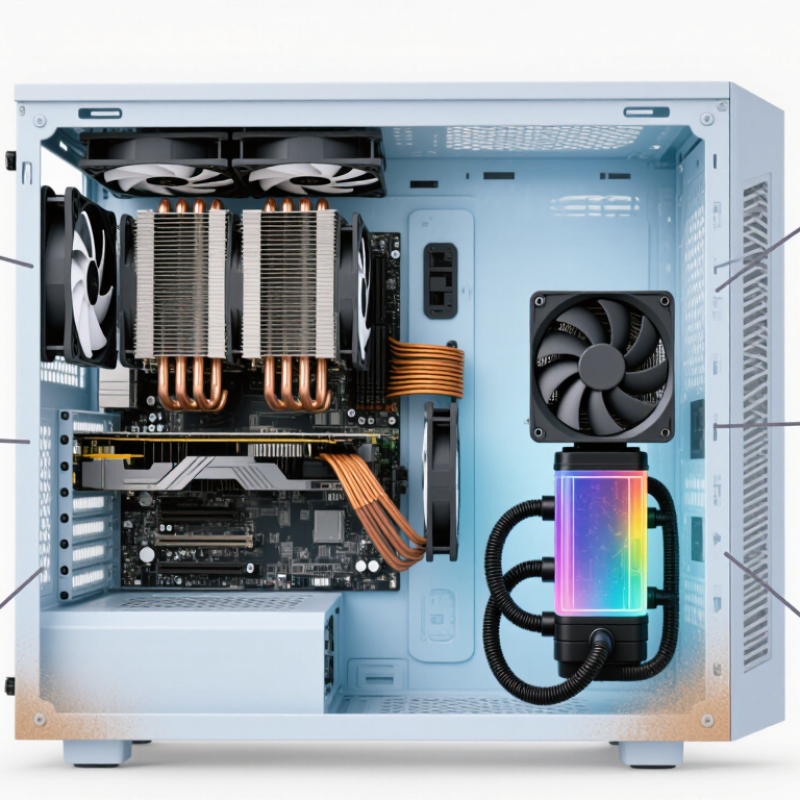
Define Your CPU Cooling Requirements and Performance Goals
How to Choose the Best CPU Cooler for Your PC?
Define Your CPU Cooling Requirements and Performance Goals
Start with the processor’s power behavior, not just its advertised heat rating. A published thermal value is useful, but it does not always represent sustained power during heavy workloads. Check socket compatibility, cooler height, radiator space, and memory clearance before comparing designs. Measure your case carefully. A few millimeters can decide whether installation is smooth or frustrating.
Define your workload clearly. Gaming, office work, video editing, and 3D rendering create different cooling demands. Short bursts may suit a compact air cooler, while long rendering sessions need stronger sustained heat removal. Set a practical temperature target, such as avoiding thermal throttling during repeated tests. Also decide how much noise you can tolerate at your desk. Quiet matters.
Your room temperature affects every result. A cooler that performs well in a cool test room may struggle during summer. I once chose a cooler by peak temperature alone and ignored fan noise. The system stayed safe, but it became unpleasant during long sessions. That was a poor performance goal. Consider idle noise, load temperature, fan speed, and installation effort together. Reliable mounting pressure and clean airflow often matter more than impressive specifications. Leave some capacity for future upgrades. Not too much. Overspending on unused cooling can reduce the budget for memory, storage, or power delivery.
How to Choose the Best CPU Cooler for Your PC?
Match the cooler to your CPU's sustained power draw and performance goal. A useful target is to select cooling capacity with approximately 35% headroom for boost behavior, warm room conditions, and quieter operation.
How to read this chart: Higher-power CPUs require greater cooler capacity. For quiet everyday use, choose a cooler near or above the target capacity. For sustained heavy workloads or overclocking, additional thermal headroom helps maintain performance and reduce fan noise.
Evaluate Thermal Performance, Noise Levels, and Reliability
A suitable CPU cooler should control heat during real workloads, not only during short benchmark runs. I compare temperatures after ten minutes of sustained rendering and gaming. I record room temperature, fan speed, and processor power. Numbers need context. A cooler showing 70°C in a cool room may perform differently in summer.
Noise matters. I listen from about one meter away, where a sharp fan tone becomes easy to notice. A lower average decibel reading does not always mean greater comfort. Some fans produce a distracting hum during sudden speed changes. Choose a cooler with a gradual fan curve, especially for a computer placed beside your desk.
Reliability depends on more than cooling capacity. Check the mounting system, cable quality, fan bearing design, and clearance around memory modules. A secure mount should remain firm after repeated temperature changes. My first comparison was flawed because I used different thermal paste amounts. That mistake changed the readings. Repeat tests when possible, and treat small temperature differences cautiously. Dust also changes results over time, so inspect the cooler every few months. A modest cooler with stable performance may be wiser than an extreme model that runs loudly. Conversational specifications can mislead. Test evidence is stronger.
Choose Features, Installation Method, and Overall Value
Choosing the best CPU cooler starts with matching features to your computer and workload. A cooler should fit the processor’s heat output, case height, and motherboard socket. Air coolers are usually simpler, while liquid coolers can offer flexible placement and cleaner access around the processor.
Do not chase maximum size.
Check fan speed control, noise levels, radiator support, and memory clearance. A cooler with adjustable fan curves can remain quiet during office work and respond quickly during rendering.
Installation method matters just as much. A tower cooler needs firm mounting pressure and enough space around the memory slots. A liquid unit requires radiator clearance, tube routing, and careful pump positioning.
Check the manual before opening the case. I once ignored the radiator length and had to rearrange several cables. That mistake was avoidable.
Overall value includes more than the purchase price. Consider included brackets, replacement fan costs, installation time, and long-term maintenance. A cheaper cooler may become expensive if its fan becomes noisy or its mounting system feels fragile.
A simple design can be the better choice for a computer used daily. Read independent temperature and noise tests, preferably with similar processors and case layouts. Specifications can mislead. Real results depend on room temperature, airflow, dust buildup, and fan settings. Leave a little thermal headroom for warmer days, but avoid paying for performance your system will never use.
