CONTACT PHONE 816-380-4747
OPEN HOURS

Mon - Fri 8:00AM - 5:00PM Central

ADDRESS

1150 SE Hamblen Rd, Lee's Summit, MO 64081

What Is an Industrial Panel PC and How Does It Work?

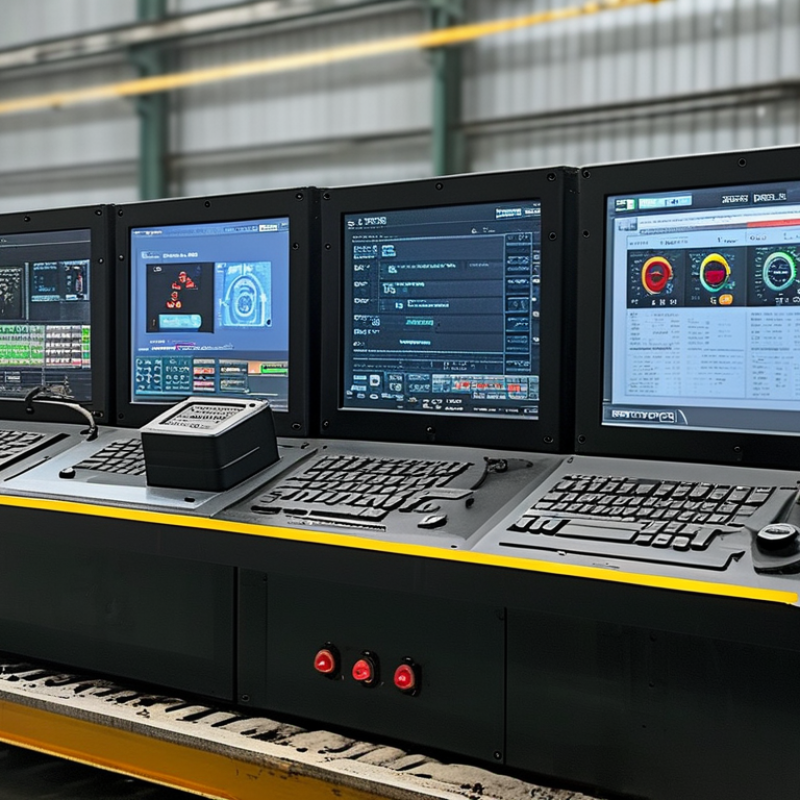
An Industrial Panel Pc combines a display, computer, and operator interface in one industrial enclosure. It runs production software while presenting buttons, dashboards, alarms, and machine data through a touchscreen. Unlike an office computer, it is designed for heat, vibration, dust, moisture, and continuous operation. Some models use fanless cooling, sealed bezels, and stainless-steel housings. Others provide resistive touchscreens for operators wearing gloves.

The system works through a straightforward chain. Sensors and controllers send data through Ethernet, serial ports, USB, or industrial protocols. The embedded processor converts that data into visual instructions. An operator then changes settings, acknowledges an alarm, or starts a controlled process. A 15.6-inch panel mounted beside a conveyor may show motor speed, temperature, and emergency status at once. Its enclosure may carry an IP65 rating, although the exact protection depends on installation and certification.

Industry demand is expanding with factory automation and edge computing. MarketsandMarkets’ Industrial PC Market report projects continued growth through 2029, supported by smart manufacturing and connected equipment. Grand View Research also identifies automation, energy, and transportation as important application sectors. Forecasts differ because researchers define “industrial PC” differently. That matters. A rugged touchscreen alone does not guarantee dependable control. Buyers should verify processor performance, operating temperature, ingress protection, software compatibility, lifecycle support, and compliance documentation. Real factory experience often reveals a less obvious weakness: poor cable routing can undermine an excellent enclosure. This article explains the internal architecture, operating process, and selection factors behind an Industrial Panel Pc, without treating every model as suitable for every plant.
What Is an Industrial Panel PC and How Does It Work?

Industrial Panel PC Definition: An All-in-One HMI for Factory Automation

An industrial panel PC is an all-in-one human-machine interface for factory automation. It combines a computer, display, and control interface in one rugged enclosure. Operators can monitor production lines, adjust settings, and respond to alarms from a single screen. Unlike office computers, it is built for dust, vibration, temperature changes, and continuous operation.

Inside, an industrial processor runs control software, visualization tools, and data services. The panel PC connects with programmable controllers, sensors, drives, cameras, and manufacturing networks. A technician might view motor speed, pressure readings, and batch status on one dashboard. Touch input makes changes faster, especially when workers wear gloves. Sealed front panels also simplify cleaning around packaging or processing equipment.

Reliable installation requires more than strong hardware. Engineers must check voltage, mounting depth, screen visibility, and network compatibility. Poor ventilation can still shorten service life. A bright display may become difficult to read under direct factory lighting. These details are easy to underestimate. No design is perfect. In practice, teams often improve the interface after watching operators use it during a busy shift. Clear alarm colors, physical buttons, and simple screens can prevent costly hesitation. Regular backups, access controls, and maintenance records also support dependable operation.

Industrial Panel PC: Typical Communication Data Rates

An industrial panel PC combines a display, computer, and human-machine interface in one enclosure. It collects sensor and PLC data through industrial communication interfaces, visualizes operating conditions, and sends commands back to the automation system. The values shown are nominal maximum data rates commonly associated with each interface and can vary with cable length, network configuration, and device settings.

Core Architecture: x86/ARM CPUs, RAM, Storage, I/O, and Touch Displays

An industrial panel PC combines a computer, display, and control interface in one rugged enclosure. Its core architecture usually includes an x86 or ARM processor, RAM, storage, industrial I/O, and a touch panel. MarketsandMarkets reported that the global industrial PC market was valued at about USD 5.3 billion in 2023, reflecting wider adoption of edge computing on factory floors.

The CPU determines how quickly the panel handles visualisation, data logging, and local analytics. x86 processors often support complex software and larger operating systems. ARM designs can reduce energy use and heat. RAM affects multitasking, especially when dashboards, alarms, and device protocols run together. Eight gigabytes may suit a basic HMI, while heavier applications need more. Storage should resist vibration and sudden power loss. Solid-state drives are common, but their endurance ratings still deserve attention.

I/O defines practical usefulness. Ethernet, USB, serial ports, digital inputs, and fieldbus interfaces connect sensors, drives, scanners, and controllers. A commissioning mistake I have seen is counting ports without checking electrical isolation. The numbers looked adequate. The system was not. Touch displays typically use projected capacitive or resistive technology. Capacitive screens feel faster, but gloves, moisture, and metal dust can reduce accuracy. Resistive panels work better with gloves, though they require firmer input. VDC Research has consistently identified environmental durability and lifecycle support as major industrial computing requirements. That matters because a bright screen is not enough when temperatures fluctuate, operators wear gloves, and maintenance access is limited.

How It Works: 24 VDC Power, Real-Time Processing, and Machine Communication

What Is an Industrial Panel PC and How Does It Work?

An industrial panel PC combines a rugged computer with a built-in display and touch interface. It often runs from a stable 24 VDC supply used in control cabinets. This voltage supports common sensors, controllers, and protection devices. Inside, a power circuit filters electrical noise and manages voltage changes. Reliable grounding remains essential. A loose terminal can cause random restarts, even when the computer appears healthy.

Real-time processing lets the panel PC receive data and react with limited delay. It may read temperature values, monitor motor speed, or display alarm conditions. Communication ports connect it with controllers, drives, sensors, and plant networks. Protocol conversion can help different devices exchange useful data. However, real-time performance depends on software design, network traffic, and processor workload. Fast hardware alone does not guarantee fast control. That detail is often underestimated.

Tips: Use a protected 24 VDC source with suitable current capacity. Keep power cables away from high-noise motor wiring. Check connector tightness during maintenance. Test communication loss, not only normal operation. A screen may stay active while field data has already stopped updating. Record response times under realistic loads. Small tests reveal large weaknesses.

What Is an Industrial Panel PC and How Does It Work? — 24 VDC Power, Real-Time Processing, and Machine Communication
System Dimension Typical Specification or Data How It Works in an Industrial Environment Engineering Considerations
Primary Function Integrated industrial computer with a built-in display and touch interface Runs visualization, monitoring, control, data collection, and supervisory software from one enclosed unit. The computer and display should be selected as a matched system for the required operating temperature, enclosure rating, and software workload.
Input Power Commonly 24 VDC nominal; allowable input range varies by design A DC power circuit converts the incoming plant supply into regulated voltages for the processor, memory, storage, display, and interface electronics. Use a properly sized, protected power supply. Check the manufacturer’s voltage range, polarity, grounding, surge protection, and inrush-current requirements.
Power Consumption Typically about 20–150 W, depending on processor, display size, storage, and peripherals Lower-power systems support HMI and data tasks, while higher-power configurations handle more demanding visualization, analytics, or edge workloads. Calculate heat dissipation and backup-power capacity from the actual operating load rather than the nominal input voltage alone.
Processing Industrial x86 or ARM processor with solid-state memory and system RAM The CPU executes the operating system and application logic, while RAM holds active data and solid-state storage retains software, logs, and configuration files. Select processing capacity according to application cycle time, number of data sources, graphics requirements, and future software updates.
Real-Time Behavior Deterministic performance depends on the operating system, software architecture, and communication method The panel PC can display and process live machine data, but hard real-time control generally requires a real-time operating system, dedicated controller, or motion-control hardware. Do not assume that a general-purpose desktop operating system provides guaranteed microsecond-level response.
Display Common diagonal sizes range from approximately 7 to 24 inches; resolutions vary by model The display presents process values, alarms, trends, recipes, diagnostics, and operator commands through a graphical interface. Consider viewing distance, brightness, glove operation, sunlight readability, and the required aspect ratio before selecting the panel size.
Touch Interface Projected-capacitive or resistive touch technology Touch input is translated into cursor actions, button commands, parameter changes, or navigation events within the HMI application. Projected capacitive touch is suitable for multi-touch and glass-front designs; resistive touch can be useful with gloves or pointed tools.
Machine Communication Ethernet, serial interfaces, USB, and optional fieldbus or industrial network interfaces Communication drivers exchange status, measurements, commands, and alarms with PLCs, controllers, drives, sensors, databases, and higher-level systems. Verify protocol compatibility, connector type, network topology, bandwidth, isolation, and cybersecurity requirements.
Common Protocols Examples include Modbus TCP, Modbus RTU, OPC UA, MQTT, and vendor-neutral industrial Ethernet protocols Software drivers map machine data into readable tags or variables that can be displayed, logged, analyzed, or passed to other systems. Protocol availability is application-dependent. Confirm licensing, data-update rates, time synchronization, and required gateway hardware.
Data Logging Local storage may include industrial solid-state drives or embedded flash memory The system records process values, alarms, operator actions, production counts, and maintenance information for analysis and traceability. Use write-endurance calculations, scheduled backups, log-retention policies, and recovery procedures to reduce data-loss risk.
Operating Temperature Industrial ranges commonly begin around 0–50°C, with rugged models extending beyond this range The enclosure, cooling design, processor, storage, and display are selected to operate within the specified ambient temperature range. Account for cabinet temperature, direct sunlight, internal heat sources, airflow, altitude, and condensation.
Cooling Method Fanless conduction or passive cooling is common; forced-air cooling may be used for higher heat loads Heat moves from electronic components to the enclosure or heatsink and then to the surrounding environment. Fanless designs reduce moving parts and dust intake, while fan-cooled designs may support higher performance but require filter and maintenance planning.
Ingress Protection Front-panel ratings such as IP65 are common; the complete system rating depends on the enclosure and installation Sealed front bezels and gaskets help protect the display and controls from dust and water jets under specified test conditions. An IP rating is not automatically a full-system rating. Cable glands, rear connectors, cabinet interfaces, and mounting hardware must also be sealed correctly.
Mounting Options Panel mount, arm mount, wall mount, or VESA-compatible mounting The computer is positioned near the operator or machine while maintaining access to power, communication, and service connections. Check cutout dimensions, mounting depth, support strength, cable bend radius, vibration, and service clearance.
Electrical Protection May include input fusing, reverse-polarity protection, overvoltage protection, and transient filtering Protection circuits limit damage caused by wiring faults, supply disturbances, and electrical transients on the DC distribution system. Protection features vary by model. Use external circuit protection and follow the applicable electrical installation standards.
Reliability Factors Solid-state storage, reduced moving parts, industrial-rated components, and controlled thermal conditions These design choices help the system operate continuously in environments with vibration, dust, electrical noise, and long service intervals. Reliability depends on the whole installation, including power quality, grounding, temperature, vibration, software maintenance, and storage endurance.
Typical Applications Machine HMI, production monitoring, test systems, building automation, logistics, and edge data collection The panel PC combines local visualization and computing with direct access to machine and plant data. Use a dedicated PLC, safety controller, or motion controller where certified safety or deterministic control functions are required.
Cybersecurity Role-based access, network segmentation, secure updates, backups, and application hardening Security controls reduce unauthorized access to machine interfaces, production data, and control-related applications. Disable unused ports and services, control removable media, apply tested updates, and coordinate security practices with plant operations.

Industrial Reliability: IEC 60529 IP65 Protection and IEC 60068 Testing

An industrial panel PC combines a display, computer, and control interface in one rugged enclosure. Its processor runs visualization software, machine interfaces, and production records. Touch input replaces a separate keyboard in many dusty work areas. Internal storage and industrial communication ports connect it to sensors, controllers, and factory networks.

IEC 60529 defines IP65 protection. The first digit, 6, means the enclosure is dust-tight. The second digit, 5, indicates protection against water jets from any direction. This matters near cutting fluids, washdown areas, and airborne powder. However, IP65 does not certify immersion. It also does not protect badly fitted cables or damaged seals.

Reliability testing adds evidence beyond enclosure ratings. IEC 60068 includes methods for dry heat, damp heat, vibration, shock, and temperature change. For example, IEC 60068-2-6 addresses sinusoidal vibration, while IEC 60068-2-27 covers mechanical shock. Test severity and duration must be recorded; a pass without those details tells too little. Field engineers should inspect connectors, mounting brackets, and touchscreen behavior after testing. Real factories are messier. A certified panel PC can still fail when installation practices are weak. The IEC 60529 standard and IEC 60068 series remain useful references, but neither replaces application-specific validation.

Deployment Choices: Screen Sizes, Operating Temperatures, and Mounting Methods

Industrial panel PCs combine a display, computer, and industrial I/O in one sealed enclosure. They run production dashboards, machine interfaces, and inspection software near the equipment. Unlike office computers, they are selected for vibration, dust, washdown risk, and continuous operation. The processor receives sensor data, executes control or visualization software, and sends commands through Ethernet, serial ports, or field interfaces. A clear screen matters. So does reliable touch input.

Screen size should match viewing distance and task density. A compact 7-inch panel suits a narrow control cabinet and simple status checks. Operators reading trends or entering recipes may need 12, 15, or 17 inches. Larger screens improve visibility, but they consume more panel space and can increase heat inside an enclosure. Brightness, glove compatibility, and viewing angle deserve testing under actual factory lighting. Paper specifications can mislead.

Operating temperature is not just an ambient number. Internal heat rises when the processor works continuously, especially inside a sealed cabinet. Choose a rated range with practical margin, then verify it during a summer production shift. Mounting also changes serviceability. Flush mounting gives a clean surface, while arm or VESA-style mounting improves adjustment and access. Wall mounting can save cabinet space, but cable strain may become a hidden fault. I have seen tidy installations fail because connectors were bent too tightly. Leave room for airflow, drainage, and future maintenance.